



Journal
To use the Cyberpunk 2077 journal effectively, track your main quests and side jobs from the journal, use the quick toggle (T on PC) to focus on specific objectives, read all found shards for lore and mission progression, and remember that blue dialogue options offer valuable information or lead to more choices. For deeper immersion, check your journal for quest details, like specific shards you need to find, and track your secondary objectives by clicking on them within the quest log.
Journal & Quest Tips
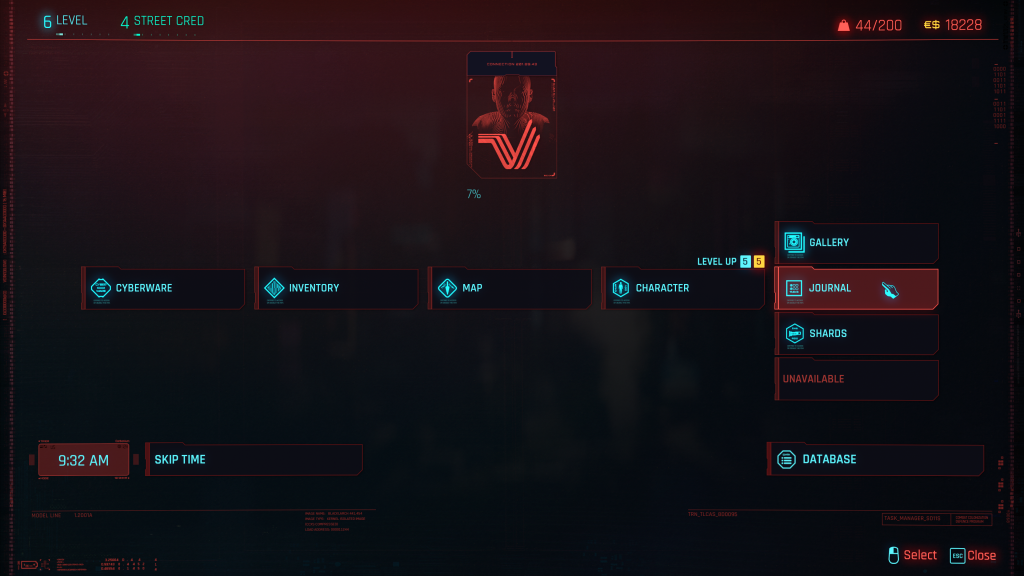
- Access Journal: Open the main menu and select the “Journal” to view your current and completed jobs, as well as any available gigs or side jobs.
- Track Objectives: Click on specific objectives (like reading a shard or finding an item) to track them in-game, or press ‘T’ on PC to instantly toggle between tracking the main quest and a secondary objective.
- Read Shards: Shards contain important lore and clues for missions; if you can’t find a specific one, look for it in your journal’s dedicated shard section.
Dialogue & Choices
- Blue Dialogue Options: Select blue dialogue options to gather more information or discover more interesting choices, which is recommended for your first playthrough.
- Attribute-Locked Options: Some dialogue options will appear grayed out if you don’t meet the required attribute, such as Intelligence or Body, for that choice.
In-Game Tips
- Loot Rarity: Enemies that drop loot are marked on your mini-map with a colored ‘X’, indicating the rarity of the loot (common grey, uncommon green, rare blue, epic purple, legendary yellow).
- Skill Progression: Use your skills and abilities frequently to improve them. For example, performing stealth actions increases your Stealth perk, while using a weapon increases your proficiency with it.